Google Bubble Level – A Simple Way To Check Surface Alignment
Getting a surface perfectly straight does not always require a toolbox full of equipment. For many basic household tasks, a smartphone can provide a convenient way to check whether something is tilted or properly aligned. This is where a google bubble level can be useful. It gives users a quick way to check the position of an object by using the motion and orientation sensors already available in many smartphones.
Whether you are hanging a frame, adjusting a shelf, positioning furniture, or working on a small DIY project, having a digital level available on your phone can save time. Instead of searching for a physical spirit level, you can use a phone-based option when you only need a quick alignment check.
What Is A Google Bubble Level?
A google bubble level generally refers to a digital leveling tool that can be accessed through Google or a compatible smartphone experience. Instead of relying on a physical tube filled with liquid and an air bubble, the digital version uses the phone’s sensors to determine its orientation.
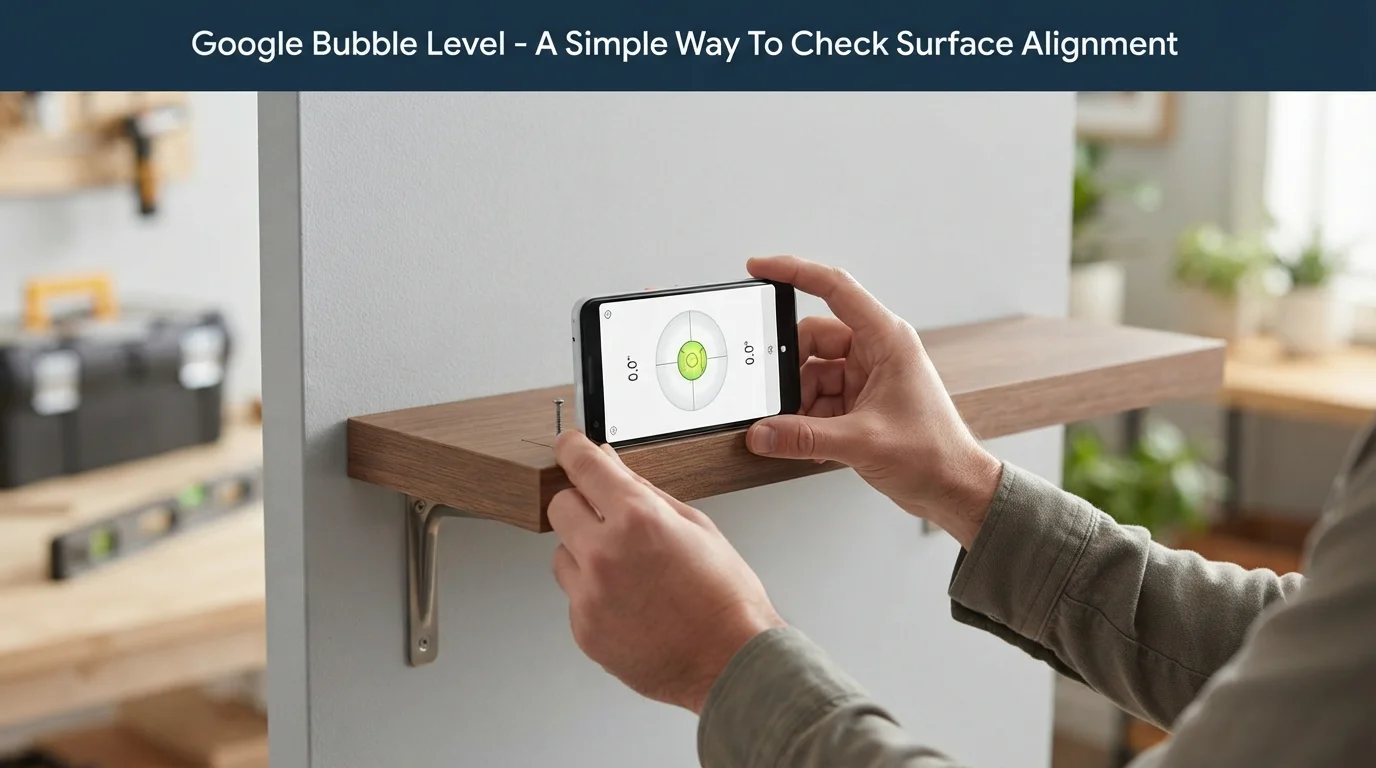
The basic idea remains similar to a traditional spirit level. A physical level shows the position of an air bubble between marked lines, while a digital tool displays the phone’s position through an on-screen indicator. Depending on the implementation and device, the display may show an angle, a moving bubble, or another visual representation of the phone’s orientation.
This makes the concept especially useful for people who need a level occasionally. A smartphone is already something most people carry with them, so a digital alternative can be more convenient for quick checks.
How Does A Digital Bubble Level Work?
The technology behind a smartphone level is based mainly on motion and orientation sensors. Modern phones commonly include an accelerometer that can detect changes in movement and orientation. Some devices also include a gyroscope, which can provide additional information about how the phone is rotating.
When you place the phone on a surface, the sensors detect its position relative to gravity. The software then converts that information into an easy-to-understand reading.
For example, if a phone is placed on a table that is slightly tilted, the digital indicator can show that the device is not completely level. When the phone reaches the appropriate position, the indicator moves toward its centered or balanced position.
The accuracy of the result depends on several factors, including the phone’s sensors, software, calibration, and how carefully the device is positioned.
Why Use A Phone Instead Of A Traditional Level?
A physical spirit level is still a useful tool, particularly for construction, carpentry, and other work where accuracy matters. However, a phone-based level has a different advantage: convenience.
You may not keep a spirit level at home, but your smartphone is usually nearby. This makes a google bubble level practical for quick jobs that do not justify buying or carrying additional equipment.
There are several situations where a digital option can be helpful:
- You need to check an object quickly.
- You are traveling and do not have tools with you.
- You are working on a small household project.
- You want to make a quick alignment check before installing something.
- You need a basic indication rather than professional measurement equipment.
The biggest benefit is accessibility. A phone can turn an everyday device into a useful tool for simple measuring and alignment tasks.
How To Use Google Bubble Level?
Using a google bubble level is generally straightforward, although the exact interface can differ depending on the device and tool being used.
Start by placing your smartphone on the surface you want to examine. Try to position the phone consistently and make sure it is making stable contact with the surface. Avoid holding it at an angle with your hand because this can affect the reading.
Once the level is displayed, watch the indicator while the phone settles. If the reading shows that the device is tilted, adjust the object or phone until the desired position is reached.
For a flat horizontal surface, you can place the phone directly on it. For a vertical object such as a picture frame or wall edge, you may need to position the phone against the surface.
The most important part is ensuring that the phone itself is positioned correctly. A digital level can only measure the orientation of the device, so poor placement can produce a misleading result.
Does Calibration Can Make A Difference?
Smartphone sensors are designed for many different functions, and they are not necessarily calibrated specifically for precision leveling. If the reading seems unusual, calibration may be worth considering.
Some digital level tools provide a calibration option. This allows the user to place the phone on a surface believed to be level and adjust the application accordingly.
Calibration can also be useful when the phone gives a slightly different result each time it is placed in the same position. Before relying on the measurement, make sure the phone’s case, accessories, or other objects are not preventing it from sitting properly.
It is also helpful to keep the phone still for a moment. Moving or rotating the device while reading the result can make the indicator fluctuate.
What Can Affect Reading?
A smartphone level is convenient, but several factors can influence its results. Understanding these limitations is important if you want to use the tool correctly.
- Phone Case and Accessories:- A thick or uneven phone case can change the way the device rests against a surface. If the case has raised edges, camera protection, or another uneven feature, the phone may not sit completely flat.
- Sensor Accuracy:- Different smartphones use different hardware. Sensor quality and calibration can vary, so two devices may not necessarily produce identical readings.
- Surface Contact:- The way the phone touches the object also matters. If it is resting on an uneven part of a surface, the reading may describe the phone’s position rather than the exact section you intended to measure.
- Movement:- Phones should be allowed to settle before you judge the result. Small movements from your hand can cause the indicator to shift.
These factors do not make digital levels useless. They simply show why a phone-based tool is better suited to everyday checks than situations requiring highly precise professional measurements.
Google Bubble Level vs. a Physical Spirit Level
Both tools serve the same basic purpose, but they are designed around different advantages.
A traditional spirit level uses a liquid-filled vial and bubble to indicate whether a surface is level. It does not depend on a smartphone battery, software, or electronic sensors. A good physical level can also be designed specifically for construction and other demanding tasks.
A google bubble level, on the other hand, offers portability and convenience. You do not need to purchase a separate tool if your phone and available software can provide the function.
For occasional household tasks, the digital approach can be perfectly practical. For professional construction, detailed woodworking, installation work, or situations where measurements must meet strict tolerances, dedicated equipment may be more appropriate.
The right choice therefore depends on the task rather than simply replacing one tool with another.
Tips For Getting A More Reliable Reading
A few simple habits can improve the usefulness of a phone-based level.
First, clean the phone’s surface before placing it against an object. Dust or debris can create a small gap between the phone and the surface.
Next, use the same side of the phone consistently when comparing different positions. If you switch between different edges or orientations, the results may not be directly comparable.
It is also useful to remove a bulky case when a more accurate reading is important. This allows the phone to make more predictable contact with the surface.
Keep the device still while checking the indicator and give the sensors a moment to settle. If the result looks inconsistent, repeat the measurement from another position.
Finally, compare the reading with a physical level when the project requires greater confidence. A phone is a convenient measuring aid, but it should not automatically be treated as a professional-grade instrument.
Can You Use It for Vertical Alignment?
Yes, a digital level can also help with vertical alignment. Instead of placing the phone flat on a horizontal surface, you can position it against a vertical object.
This can be useful when checking picture frames, cabinet sides, doors, signs, and similar items. The phone’s sensors detect its orientation, while the digital indicator provides feedback about its position.
The technique is simple, but the same limitations apply. The phone needs to make suitable contact with the object, and its shape or case should not interfere with the measurement.
For larger surfaces, checking more than one position can also provide a better understanding of whether the entire object is aligned consistently.
Final Thoughts
A smartphone can be surprisingly useful for simple measurement and alignment tasks. A google bubble level provides a convenient way to check whether a surface or object is positioned correctly without immediately reaching for a traditional spirit level.
Its main strengths are accessibility, portability, and ease of use. You can use it for everyday projects such as adjusting furniture, hanging decorations, checking shelves, and making basic alignment corrections.
At the same time, users should understand that smartphone sensors and digital readings have limitations. Proper placement, calibration, device hardware, and surface contact can all influence the result. For demanding professional work, a dedicated level remains a more appropriate choice.
For quick household checks, however, having a digital leveling option on your phone can be a practical solution when you need a fast answer without carrying another tool.